Science Data Processing Workflow
General Workflow
See level3-asn-jwst-overview for an overview of how JWST uses associations. This document describes how associations are used by the ground processing system to execute the level 2 and level 3 pipelines based on.
Up to the initial calibration step calwebb_detector1, the science
exposures are treated individually. However, starting at the level 2
calibration step, exposures may need other exposures in order to be
further processed. Instead of creating a single monolithic pipeline,
the workflow uses the associations to determine what pipeline should
be executed and when to execute them. In the figure below, this
wait-then-execute process is represented by the workflow trigger.
The workflow reads the contents of an association to determine what
exposures, and possibly other files, are needed to continue
processing. The workflow then waits until all exposures exist. At that
point, the related calibration step is executed with the association
as input.
With this finer granularity, the workflow can run more processes parallel, and allows the operators deeper visibility into the progression of the data through the system.
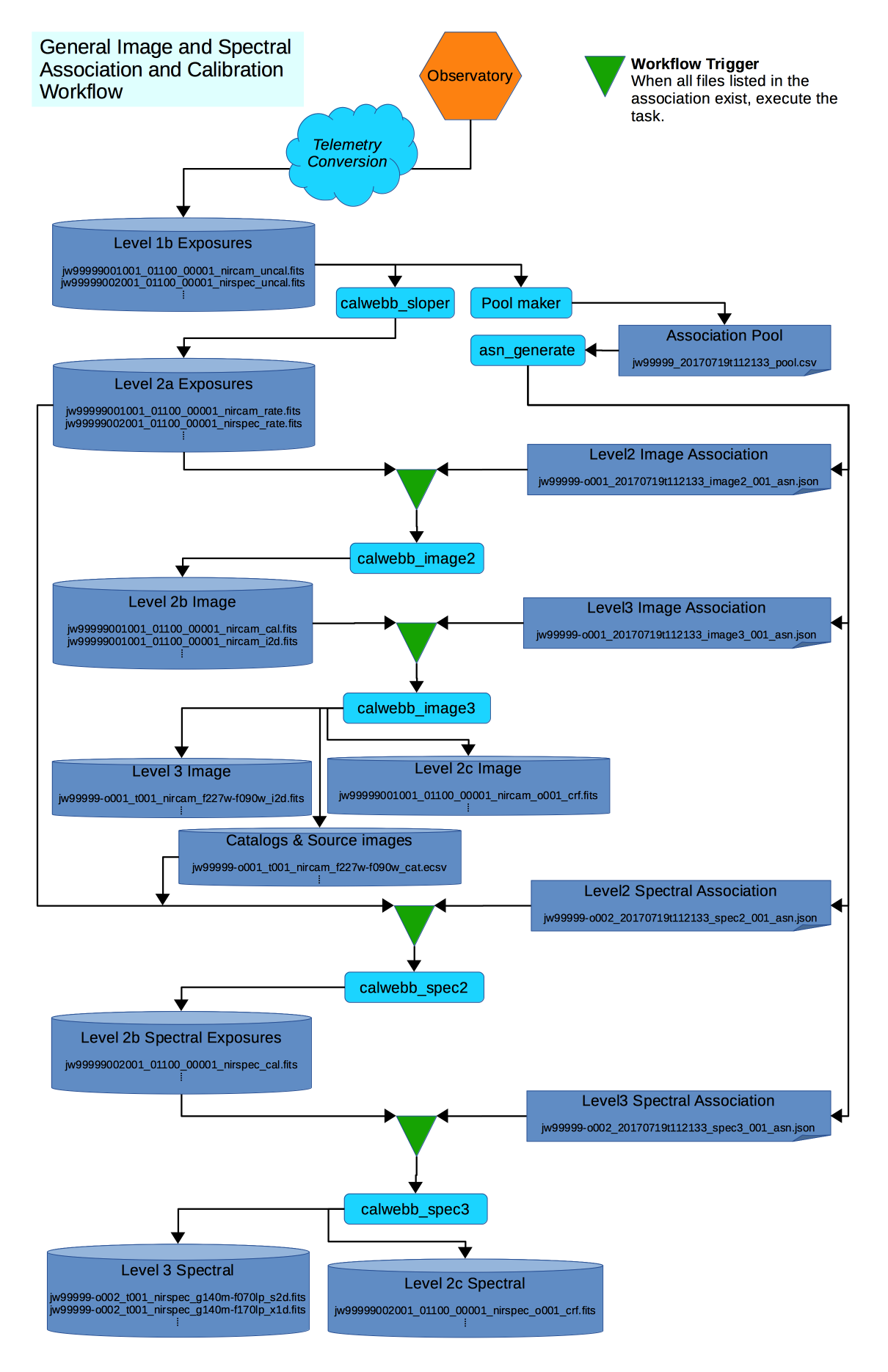
Figure 1: General workflow through level 2 and level 3 processing
The figure represents the following workflow:
- Data comes down from the observatory and is converted to the raw FITS files.
calwebb_detector1is run on each file to convert the data to the countrate format.- In parallel with
calwebb_detector1, the Pool Maker collects the list of downloaded exposures and places them in the Association Pool - When enough exposures have been download to complete and Association
Candidate, such as an Observation Candidate, the Pool Maker calls
the Association Generator,
asn_generate, to create the set of associations based on that Candidate. - For each association generated, the workflow creates a file watch list from the association, then waits until all exposures needed by that association come into existence.
- When all exposures for an association exist, the workflow then executes the corresponding pipeline, passing the association as input.
Wide Field Slitless Spectroscopy
In most cases, the data will flow from level 2 to level 3, completing calibration. However, more complicated situations can be handled by the same wait-then-execute process. One particular case is for the Wide Field Slitless Spectrometry (WFSS) modes. The specific flow is show in the figure below:
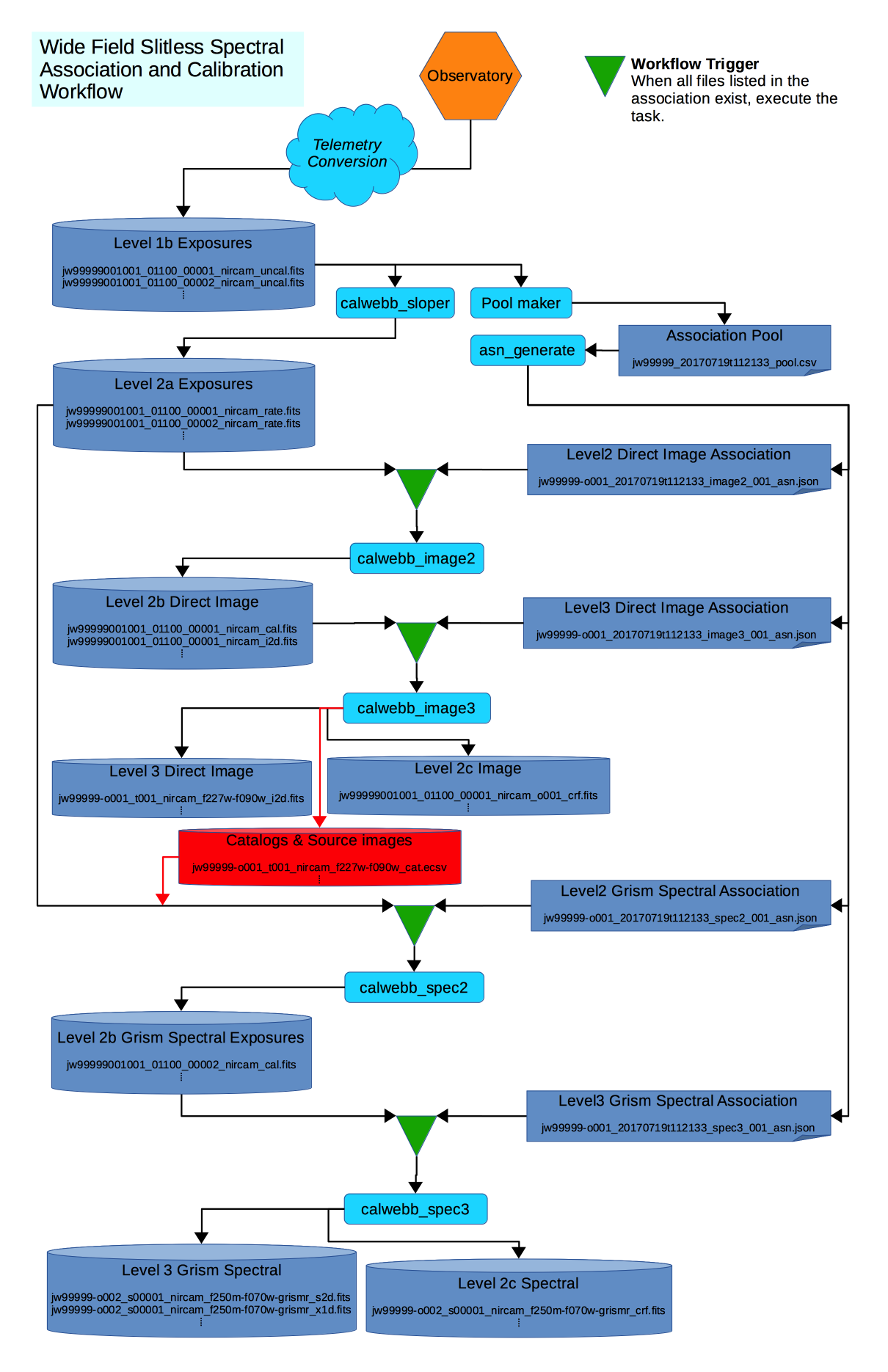
Figure 2: WFSS workflow
For WFSS data, at least two observations are made, one consisting of a
direct image of the field-of-view (FOV), and a second where the FOV is
dispersed using a grism. The direct image is first processed through
level 3. At the level 3 stage, a source catalog of objects found in
the image, and a segment map, are generated. These files are then used
as input to the level 2 processing of the spectral data. This extra
link between the two major stages is represented by the Segment &
Catalog file set, show in red in the diagram. The level 2 association
grism_spec2_asn not only lists the needed countrate exposures, but
also the catalog and segment map files produced by the level 3 image
processing. Hence, the workflow knows to wait for these files before
continuing the spectral processing.
Field Guide to File Names
The high-level distinctions between level 2, level 3, exposure-centric, and target-centric files can be determined by the following file patterns.
Files produced by level 3 processing
Any file name that matches the following regex is a file that has been produced by a level 3 pipeline:
.+[aocr][0-9]{3:4}.+
Files containing exposure-centric data
Such data have files that match the following regex:
jw[0-9]{11}_[0-9]{5}_[0-9]{5}_.+\.fits
Files containing target-centric data
Such data have files that match the following regex:
jw[0-9]{5}-[aocr][0-9]{3:4}_.+
Such data is the result of the combination of data from several exposures, usually produced by a level 3 calibration pipeline.
Note that these patterns are not intended to fully define all the specific types of files there are. However, these are the main classifications, from which the documentation for the individual calibrations steps and pipelines will describe any further details.